LuaCRM API reference
The LuaCRM API is how another system reads and updates your company’s live data. This page is where you create a key and where you open the reference that lists the calls. LuaCRM MCP is a different connection and stays on Integrations.
Where it lives
Settings → Integrations → LuaCRM API → Connect opens the token dialog. You need the integrations permission. The top row has Add, the text API base path: /api/v1, and API docs. API docs opens the reference in a new tab.
You can also open the reference while you are signed in. If you are not signed in, Lua CRM shows the sign-in page. The reference is a standalone English page. The browser tab title is API docs.
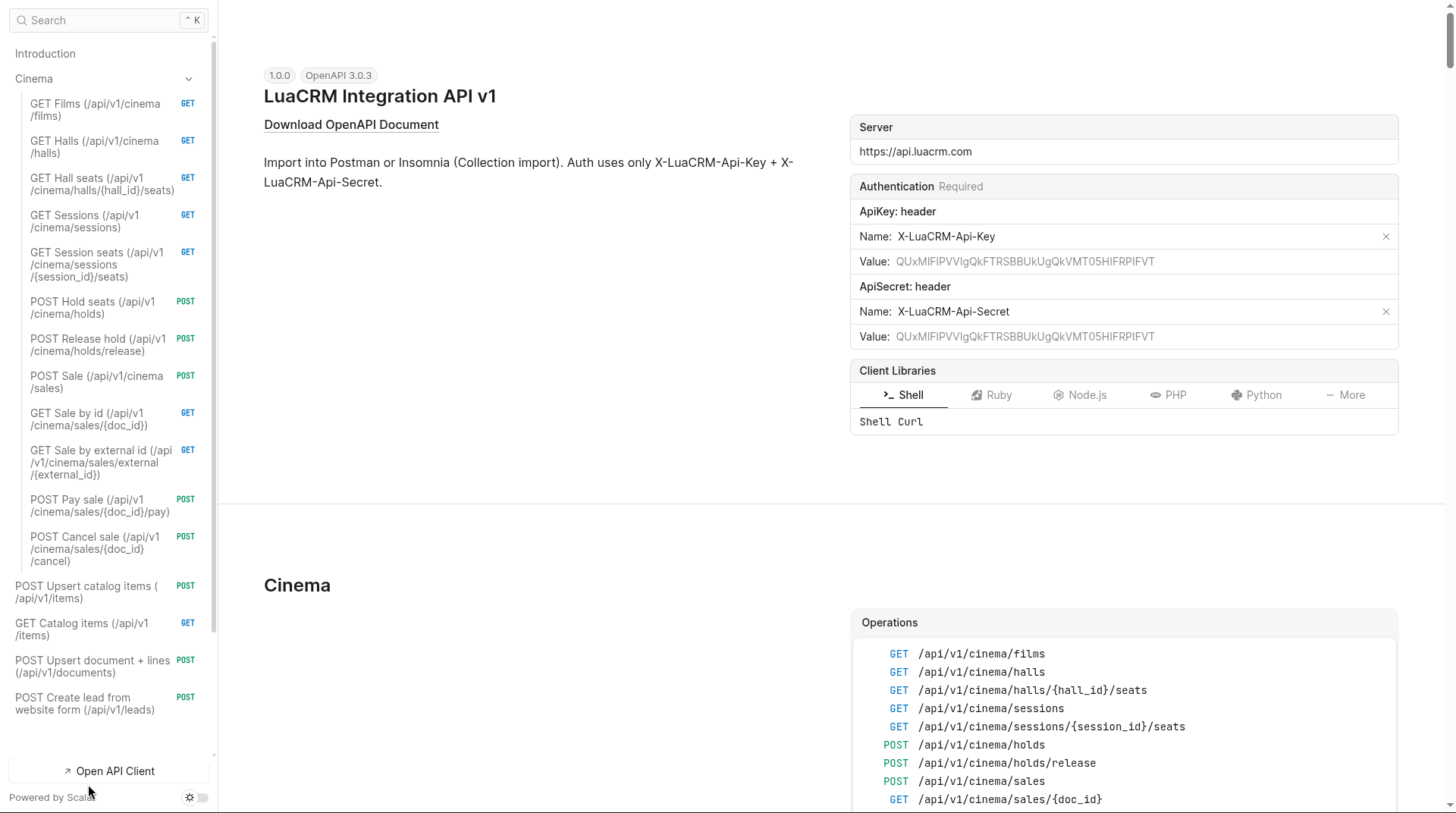
The page title is LuaCRM Integration API v1. Download OpenAPI Document saves the spec. A note on the page says you can import it into Postman or Insomnia, and that sign-in uses only the two headers below. The values shown next to those headers are examples. Use the key and secret from your own token dialog. The reference can also show client samples for Shell, Ruby, Node.js, PHP, and Python.
The machine-readable spec is at https://dashboard.luacrm.com/integrations/api-docs/openapi.json. Opening it needs a sign-in. Give that address to a developer who will import the collection.
Get a key and secret
The token dialog is where you create the pair. It is not pictured here.
| Control | What it does |
|---|---|
| Add | Creates a key (an id that starts with lca_) and a secret. The secret is shown once, in a yellow box Secret is visible only once, with Copy. A notice says Token created successfully |
| Table | Columns are ID, API key (the key id), Status (Active or Inactive), Last used, and the row actions. With no keys the table says No tokens yet |
| Regenerate token | Asks you to confirm, then issues a new key id and a new secret for that row. The old pair stops working. The new secret is shown once |
| Disable / Enable | Turns the pair off or on. A notice says Status updated successfully |
The LuaCRM API card shows Connected while at least one pair is active. Lua CRM records who created, regenerated, or turned a key on or off.
Copy the secret now. Lua CRM cannot show it again. If it is lost, use Regenerate token and update your integration.
Authentication and format
The server is https://api.luacrm.com. Paths start with /api/v1.
Every request sends two headers: X-LuaCRM-Api-Key (the key id) and X-LuaCRM-Api-Secret (the secret). There is no other sign-in. The key decides the company, so the data is that company’s live data.
Request bodies are JSON objects. A successful answer looks like {"success": true, "data": …, "meta": …}. A failed answer looks like {"success": false, "error": {"code": …, "message": …}}. A wrong or disabled key returns 401, Invalid authentication. An unknown path returns 404. A validation error returns 422.
Browser calls are accepted only from Lua CRM’s own sites. Call the API from your server, not from a public web page.
What the reference lists
Each operation in the reference shows its parameters and an example body. Use those examples on the reference page. They are not copied here.
| Group | Calls | What they do |
|---|---|---|
| Catalog items | GET /api/v1/items, POST /api/v1/items | List catalog items with variations, prices, stock per branch, and photo addresses. You can filter by group, by type (product, service, membership, material, or rental), and by status. Pages start at 1, with 20 items on a page unless you ask for another size. Create or update items matched by External ID |
| Documents | POST /api/v1/documents, GET /api/v1/documents/{doc_id} | Create or update a document and its lines. Lines change only while the document is a draft. A sale and a purchase need a contact. Read a document by its id |
| Leads | POST /api/v1/leads | Create a lead from a website form. Email or Telegram is required. A known email or Telegram returns the existing contact and does not add a request. A new one creates a lead contact and a request on the Lead project |
| Fiscal receipts | GET /api/v1/fiscal/receipts/{fiscal_receipt_id} | Read one fiscal receipt by its id |
| Wallets | GET /api/v1/accounts | Active business wallets, used as the account when a call records a payment |
| Cinema | Twelve calls under /api/v1/cinema/ | Films, halls, hall seats, sessions, the seat map for a session, hold seats for 10 minutes, release a hold, create a sale, read a sale by its id or by an external id, pay a sale (the same path as Point of Sale, with an optional fiscal receipt), and cancel seats or the whole sale |
Caution. The reference can send test requests. Those requests change your company’s real data. Use a separate key for testing and disable it afterwards. Never paste a secret into a ticket, chat, or screenshot.
Steps
- Open Settings → Integrations, find LuaCRM API, and choose Connect.
- Choose Add, then Copy the secret and store it in your integration. Note the key in the API key column.
- Choose API docs to open the reference in a new tab, or give your developer
https://dashboard.luacrm.com/integrations/api-docs/openapi.json(sign-in needed). - Send
X-LuaCRM-Api-KeyandX-LuaCRM-Api-Secretwith every request tohttps://api.luacrm.com/api/v1/…. - To stop an integration, Disable its key. To replace a leaked secret, Regenerate token.